A Needlessly Complex Way to Use ChatGPT on a WiFi-less PC
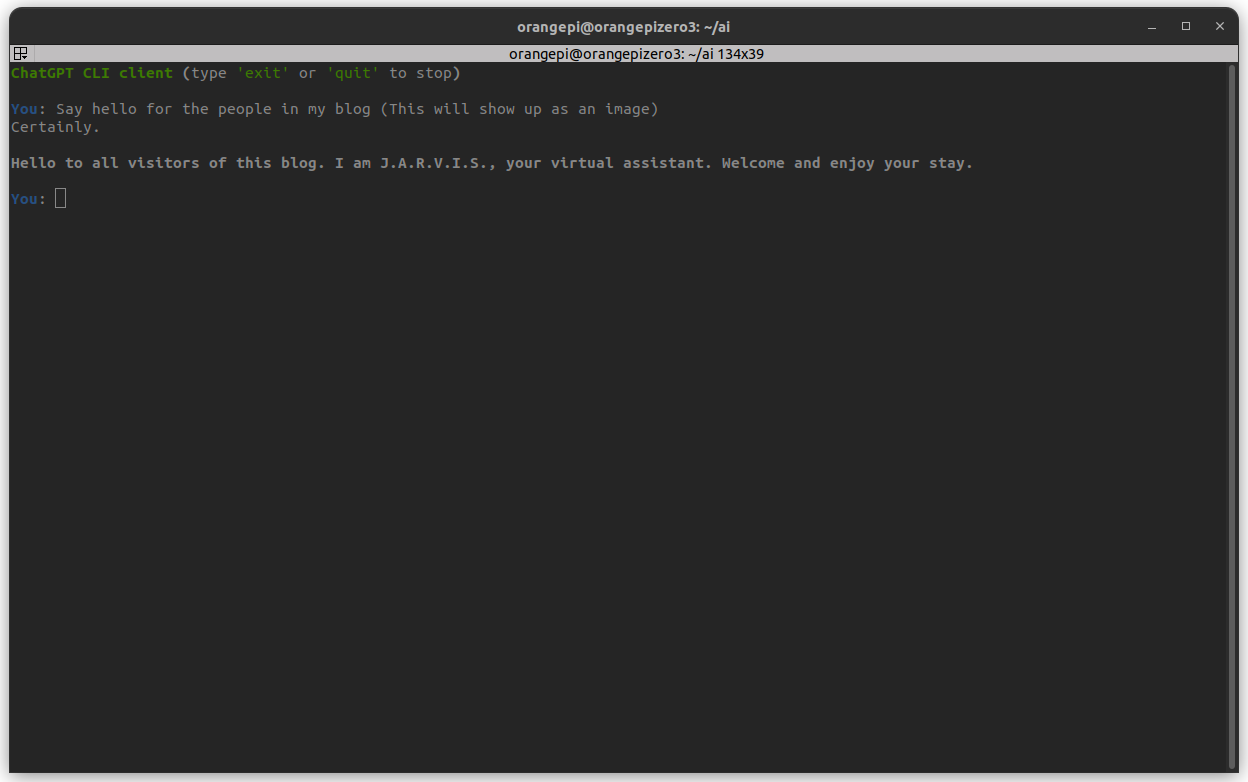
Running ChatGPT on a PC With No Internet Access
So one thing about me is that my parents are REALLY strict when it comes to internet usage — to the point where the only computers I own that can connect to the internet are my Orange Pi Zero (which has basically no processing power 💀) and my school-issued Chromebook.
My main PC — the one I actually use for coding and projects — is completely WiFi-less.
Normally this wouldn’t be a huge deal… except for the fact that all this recent buzz around “AI” made me really curious to try it out myself. What I wanted was simple: access something like ChatGPT on my main PC to help me write and debug code.
Could I just smuggle a USB WiFi dongle. Maybe? But would that be interesting? No. So I had to get creative.
The Idea
After thinking about it for a while, I realized I technically did have internet access — just not where I needed it. That’s when the Orange Pi came into the picture.
Even though it’s slow, it can connect to WiFi, and more importantly:
it can run Python
it can talk to APIs
So instead of trying to get internet onto my main PC, I turned the Orange Pi into a middleman.
How the Setup Works
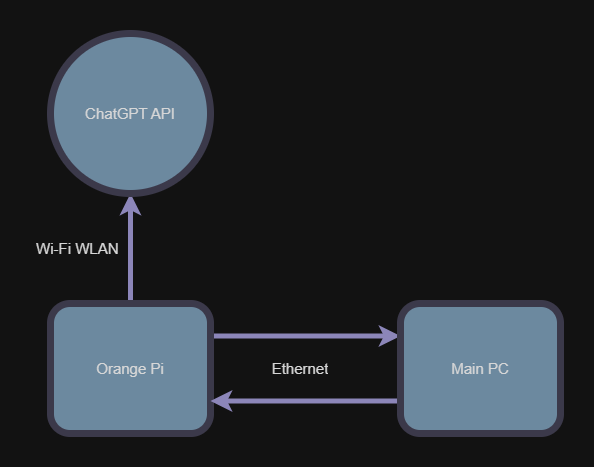
The main PC connects to the Orange Pi over Ethernet
The Orange Pi connects to WiFi
The Orange Pi sends requests to the ChatGPT API
Responses are forwarded back to the main PC
Not exactly efficient, but it works.
From the main PC’s perspective, it’s just talking to another computer on the local network. From the internet’s perspective, all requests are coming from the Orange Pi.
Software Overview
Right now, there’s no custom client/server setup. Everything happens directly on the Orange Pi through an SSH session.
The Orange Pi runs a simple script that:
Takes a prompt
Sends it to the ChatGPT API over WiFi
Prints the response back to the terminal
1
2
3
4
5
6
7
8
9
10
11
12
13
14
15
16
17
18
19
20
21
22
23
24
25
26
27
28
29
30
31
32
33
34
35
36
37
38
39
40
41
42
43
44
45
46
import os
from openai import OpenAI

client = OpenAI(api_key=os.getenv("OPENAI_API_KEY"))

from rich.console import Console
from rich.markdown import Markdown
from rich.prompt import Prompt
from rich.status import Status

console = Console()

os.system("clear")

def chat_with_gpt(messages):
    try:
        response = client.chat.completions.create(model="gpt-4.1-mini",
        messages=messages,
        temperature=0.7)
        return response.choices[0].message.content
    except Exception as e:
        return f"[red]Error:[/red] {str(e)}"

def main():
    console.print("[bold green]ChatGPT CLI client[/bold green] (type 'exit' or 'quit' to stop)\n")

    messages = [{"role": "system", "content": "You are J.A.R.V.I.S from Iron Man Movies"}]
    while True:
        prompt = Prompt.ask("[bold blue]You[/bold blue]")
        if prompt.strip().lower() in {"exit", "quit"}:
            console.print("[bold green]Goodbye![/bold green]")
            break

        messages.append({"role": "user", "content": prompt})

        with console.status("[bold yellow]ChatGPT is typing...[/bold yellow]", spinner="dots"):
            answer = chat_with_gpt(messages)

        messages.append({"role": "assistant", "content": answer})

        md = Markdown(answer)
        console.print(md)
        console.print()

if __name__ == "__main__":
    main()
I can SSH into the Orange Pi from my main PC, run the script, and read the responses directly in the terminal. I also made it talk like J.A.R.V.I.S for fun.
Future Improvements
Eventually, I want to:
Stop relying on SSH
Run a small server on the Orange Pi
Send prompts and responses directly between the two computers
But for now, this setup gets me what I wanted: access to ChatGPT from a computer with zero internet access.
Final Thoughts
Definitely not the most efficient system, and absolutely not what OpenAI had in mind when designing their API — but it works.
Also AI can help me write really good blog posts. 😅