Terminus Update - Physical Keyboard, SMS, and a Real PCB (Part 2)
A LOT has happened since Part 1.
When I wrote the first post, Terminus was just an idea and a mermaid diagram. Now it’s an actual physical device sitting on my desk that can send and receive real text messages. Here’s what happened.
The Original Plan Changed
I started with a SIM7080G modem and a Hologram SIM card. Got it working - the modem talked to my website over HTTP and I had a basic two-way chat interface running. Cool proof of concept.
But then I switched to something simpler. Instead of the device handling cellular directly, I moved all the messaging stuff to a Flask server on PythonAnywhere. The ESP8266 just talks to my server over WiFi, and the server talks to SignalWire (still temporary solution) to send and receive real SMS to normal phone numbers. Less complexity on the hardware side, which turned out to be the right call.
The Hardware Got Real
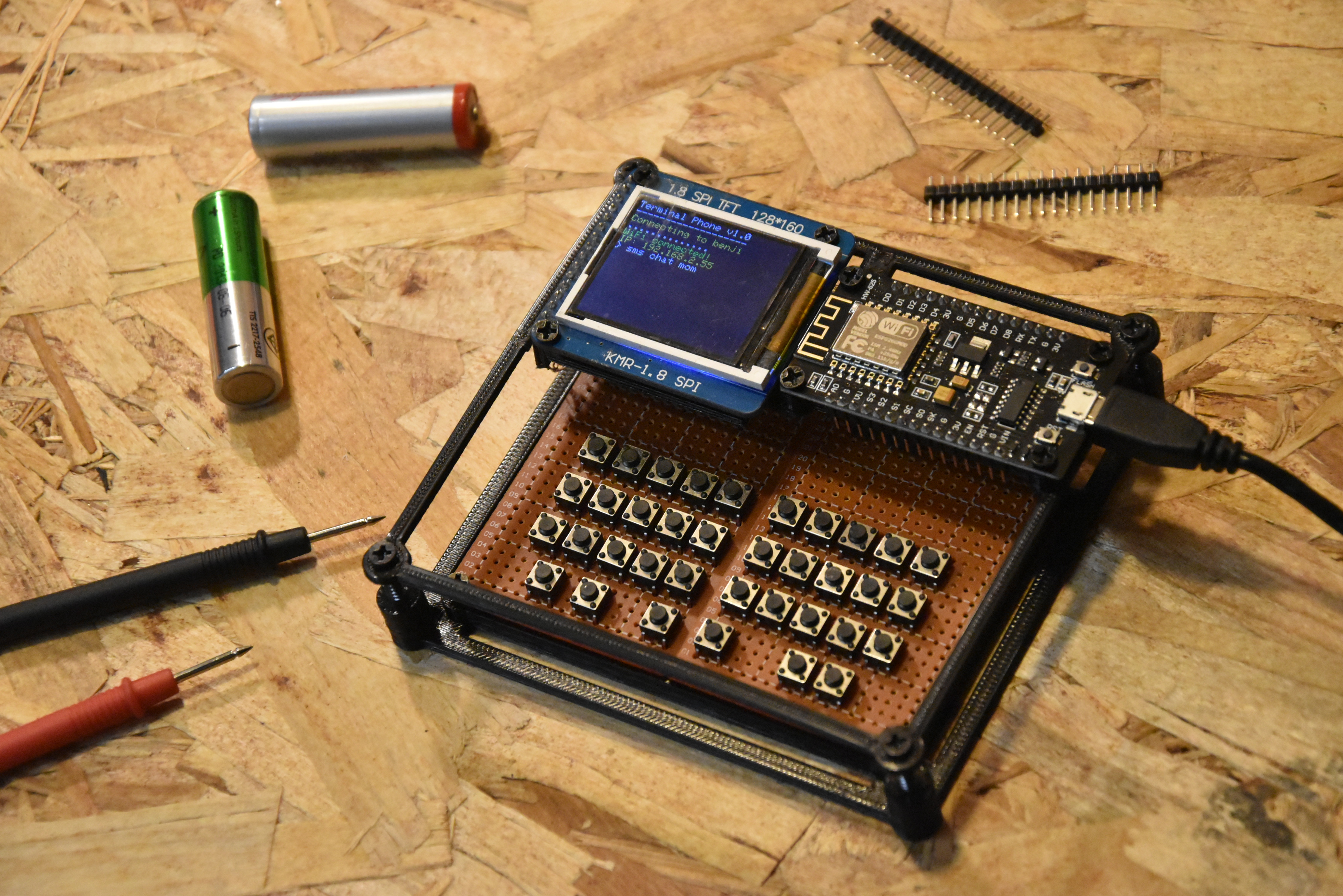
The biggest update is the keyboard. I hand soldered 36 tactile pushbuttons onto protoboard in a 3x10 grid with a row of 6 function keys at the bottom. It’s driven by a STC15W204S
- same chip I used in my binary watch - which scans the matrix and sends clean keypresses to the ESP8266 over UART. Shift and Ctrl modifiers are handled on the keyboard side so the ESP8266 just receives characters.
I also 3D printed a corner bracket frame that holds everything together. It’s not a full enclosure yet but it makes it feel way more like a device and less like a pile of parts.
The Display Got Better
I rewrote the entire display layer. Before, TFT calls were scattered everywhere. Now there’s a dedicated Terminal class that manages a line buffer, handles scrolling, and lets me print colored text without thinking about the hardware. There’s also a blinking cursor using millis() that toggles every 500ms. Small thing but it makes it FEEL like a real terminal.
SMS Chat Actually Works
When you type sms chat admin the screen splits into three zones - contact bar at the top, message history in the middle, send bar at the bottom. Your messages are white, incoming are yellow. The status bar shows retry progress live (try 1/3 in yellow, sent in green, failed in red).
Chat history is saved to flash with LittleFS so it survives reboots. Before, everything disappeared when you powered off. Not anymore.
The Web Server Got a Full Redesign
The Flask backend went from a rough prototype to a proper multi-file blueprint architecture with an admin dashboard, user management, paginated message log, and contact name assignment. The UI has a dark terminal aesthetic - teal for outgoing, amber for incoming. Looks exactly how I wanted it.
What’s Next
I just started working on a real PCB in EasyEDA. It’ll have a CH340C for USB-serial, MCP1700 for battery power, and a USB-C connector. This is the step that takes it from prototype to something actually portable.
I’m thinking of returning to the Hologram SIM card in order to get data in areas without internet.
Still need to finalize the SMS provider situation and get arrow keys working in the keyboard firmware. But the core thing works - I can send and receive text messages on a device I built from scratch. That’s pretty cool.
Demo video is up on the Hackaday project page and all the code is on GitHub.
More updates soon.